Building XILocal - A TUI for FFXI Data Exploration
Sep 17, 2025 - ⧖ 4.0 minI recently built XILocal, a terminal-based application for exploring Final Fantasy XI (FFXI) game data. This project combines my interests in Rust programming, database design, and creating intuitive command-line tools. In this post, I'll walk you through the key features of XILocal.
Project Overview
XILocal is structured as a multi-crate Rust workspace, consisting of:
- model: Data structures representing FFXI items, armor, weapons, jobs, races, and more
- xilocal_db: Database management with SQLite backend and data import tools
- tui: The terminal user interface built with Ratatui
The application provides two main features: equipment search and mob level search, all accessible through a clean, keyboard-driven interface.
Terminal User Interface Design
One of the most interesting aspects of XILocal is its TUI implementation. I chose Ratatui because it has great layout support and widget creation capabilities. The interface uses a tabbed layout with system-level input handling that allows seamless navigation.
The core of the TUI is an input layer system that processes events in reverse order from application-specific layers to system-level ones. This design ensures that context-specific inputs are handled first, while global shortcuts like 'q' to quit remain accessible at all times.
// Input handling is processed in reverse. Layers
// that are closer to system-level functionality
// should be first in the vec.
vec! [
InputLayer :: Quit ,
TabsInputLayer :: TabSelection . into (),
EquipQueryInputLayer :: QueryBoxQuestionmarkCapture . into (),
// ... more layers
] Whenever a "window" or focus target opens, it pushes it's handler onto the stack. While on the stack, all input events are sent to the handler. The handler then decides what to do (consume or pass). If passed, then the input goes on to the next handler. Once the handler is done (like a window closes), then it pops itself off the stack.
The Query Bar: Real-Time Equipment Search
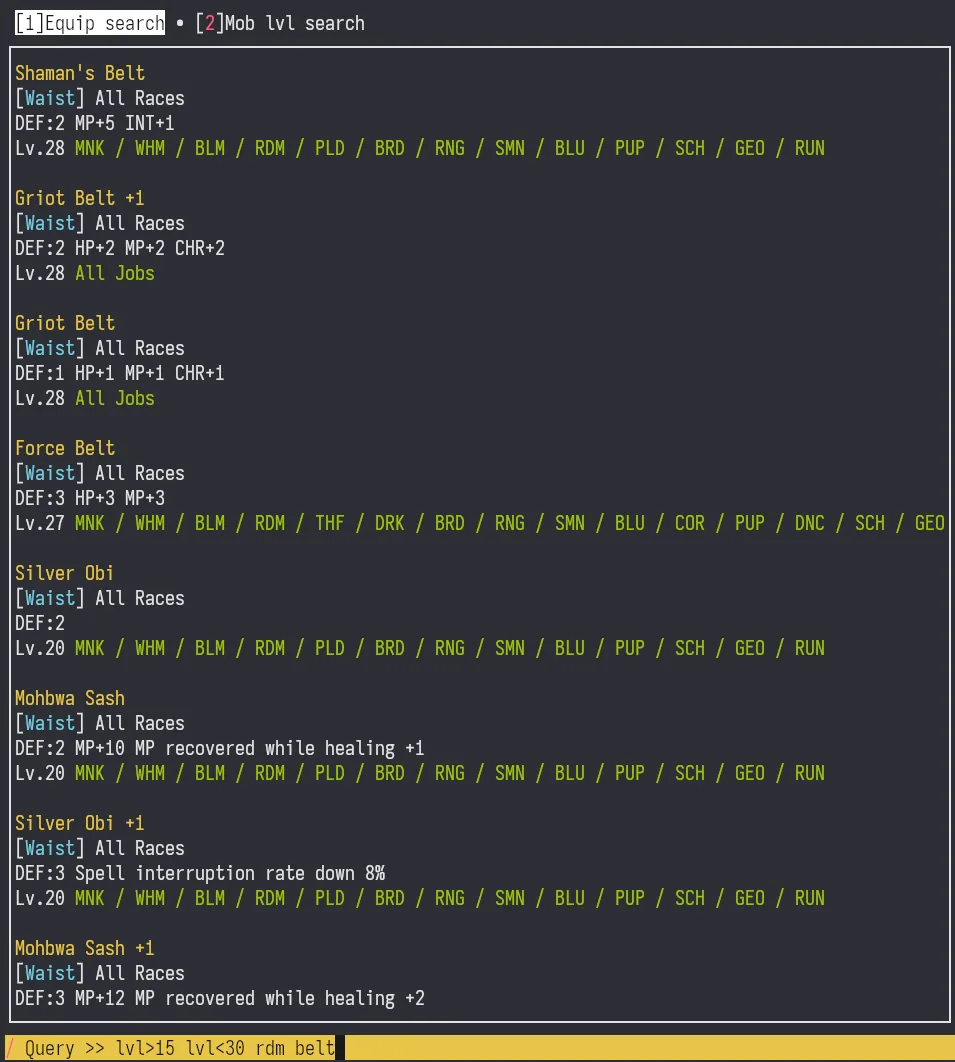
The main reason I built this app is to quickly find equipment in a game that has 10k+ pieces of it. The equipment query bar is activated by simply pressing /.
Design Philosophy
I wanted the query bar to feel instantaneous and responsive, so I implemented real-time query execution. Every keystroke triggers a background search by spawning a new task, with previous queries being aborted to prevent resource waste.
Query Language
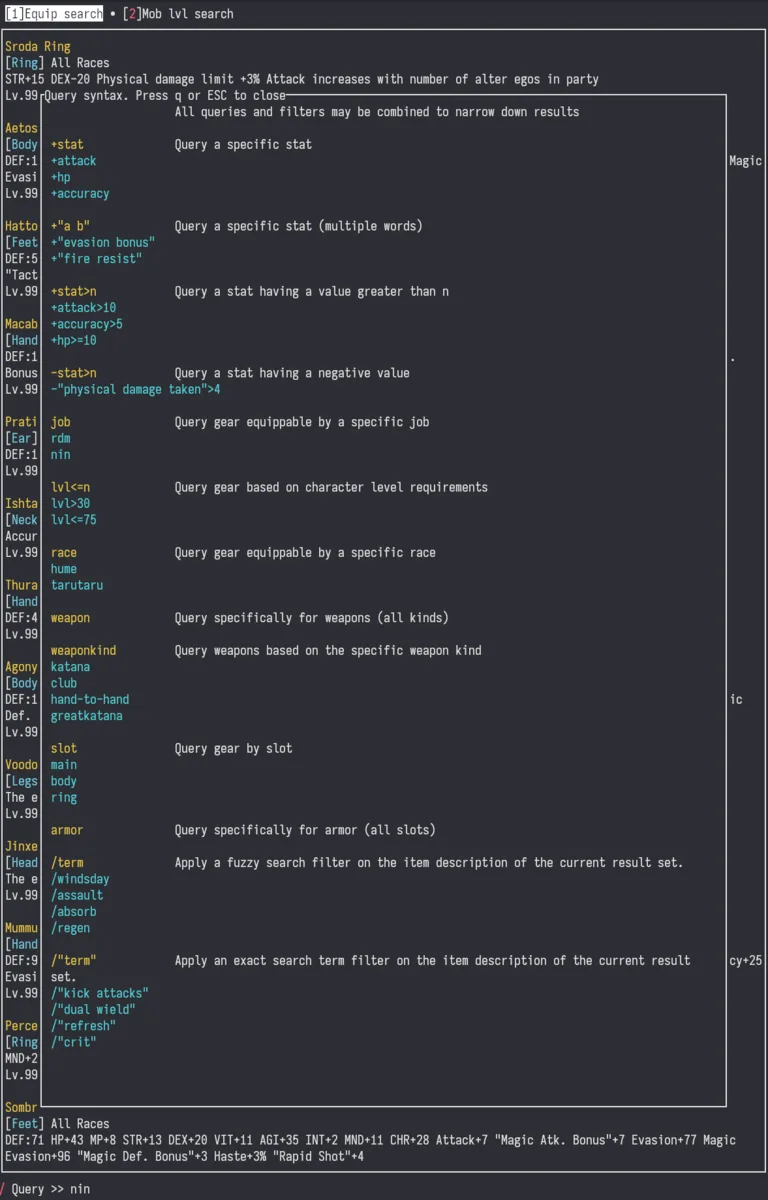
The query system supports a rich syntax that allows complex filtering:
- Job filtering:
rdmorblmto find equipment for specific jobs - Stat requirements:
+mnd>5to find items with Mind stat above 5 - Item types:
weapon,armorto filter by equipment category - Fuzzy search:
/augmentsfor description-based matching - Exact matches: Direct item names
The parser breaks queries into chunks, handling quoted strings and special operators intelligently.
Implementation Highlights
The query box uses the ropey crate for efficient text manipulation, supporting basic cursor movement and editing operations.
When focused, the entire query bar gets highlighted in yellow with black text, providing clear visual feedback.
Equipment Search Backend
Behind the query bar is a faceted search search engine that combines SQL queries with in-memory filtering. This allows stat-based searches and post-query filtering for categorical data like jobs and races.
Results are sorted by item level (highest first) and can include weapons, armor, and any other piece of equipment. Fuzzy matching uses the fuzzy-matcher crate.
Mob Level Search Feature
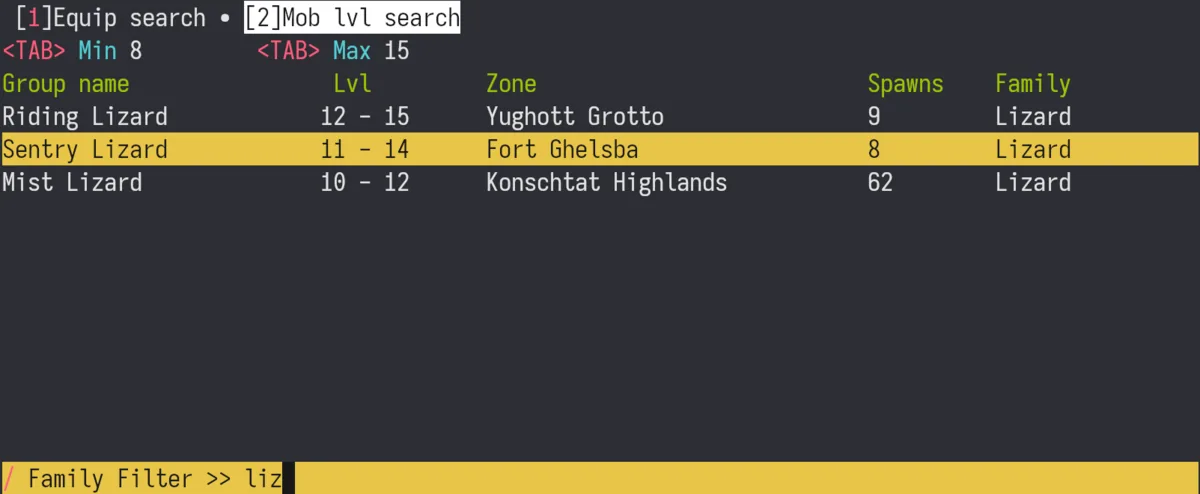
Complementing the equipment search is a mob level search tool. Users can filter monsters by level range and family type, with results showing spawn zone and mob counts. This feature primarily helps players find exp camps.
Database Architecture
XILocal uses SQLite for local usage and includes data for:
- Item data with stats and descriptions
- Mob spawn points and group information
- Zone and family classifications
- Drop rates
Data import scripts and tooling was also written to help populate the database from various online sources.
Conclusion
XILocal represents my exploration of building efficient, user-friendly tools for game data analysis. The query bar, showcases how terminal interfaces can provide powerful functionality through thoughtful design and real-time feedback. The combination of Rust's performance, Ratatui's flexibility, and a well-structured query language creates an experience that's both powerful and intuitive.
Screenshots