Production Calculator
Jul 21, 2019 - ⧖ 4.0 minWhere I work, we have hourly production reports are generated in order to help employees meet production targets. However, the reports that get generated from the computer are fairly bare-bones and consist of only two values: number of items processed and whether the item is essentially type A or type B. In order to provide meaningful data to employees, I have been manually calculating production targets based on expected goals for a particular reporting period. After doing this for months on end, I decided it was time to automate this as much as possible, so I wrote an app to do just that.
Gathering Requirements
The requirements I came up for this app were simple:
- Calculate production rate based on the data from the report
- Display production targets for predefined time periods
While there are only two data points on the report (unit count & unit type), three data entry fields are actually needed for the application:
- Unit count for type A
- Unit count for type B
- Report time period
The reports are generated hourly and, as a result, there will be times when breaks and lunch periods should be accounted for. This gives us three regular cases that must be considered:
- Production occurred for a full hour
- Employee took a break during the hour
- Employee took a lunch during the hour
In order to maximize user-time efficiency of the application, it makes sense to predefine these three time periods so the period doesn't have to be manually entered on a regular basis.
Tech Selection
I knew the application had to operate on mobile since I am out on the floor working when these reports get generated. As usual with my programs, I opted to use the web as an application host. It's hard to beat the web when it comes to simple apps, plus other people would be able to use the application on my days off without any additional effort.
This app was also mostly an excuse to learn how to program in Elm, which is my new favorite programming language for the web.
Since there is nothing fancy about the requirements for this application, a SPA implementation was chosen with static hosting.
The build workflow was custom per my own guidelines, which made working on the application quick and enjoyable.
Implementation
Since I was using this project to learn Elm, the first half hour was mostly just wrapping my head around the syntax of the language. Thankfully, the concepts were familiar due to my experience in writing Rust code. I wrote about 6 micro applications in Elm before I was comfortable enough to start making the calculator program.
Elm made creating this app extremely easy as there are no "gotchas" when programming in Elm; everything gets checked at compile time. This allowed me to have a fully working application in about two hours (once I overcame the foreign Elm syntax):
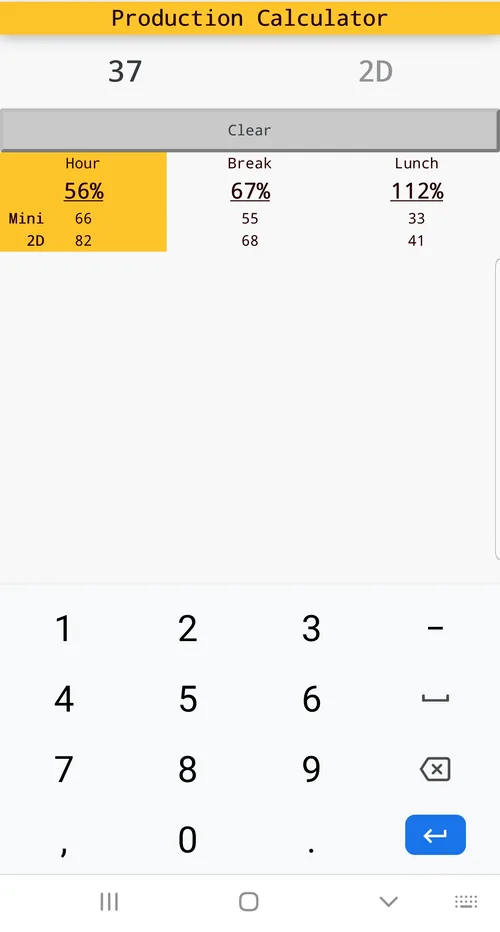
It was rather minimal and only calculated three predefined time periods for "Hour", "Lunch", and "Break." Selection of the different time periods was implemented strictly as a visual aid. Obviously this wasn't ideal, but I wanted the application quickly and it worked.
Normally I only need the predefined time periods, but after just a few days of using the app I fairly quickly ran into a situation where I needed to calculate production of a period outside of the predefined ranges. This was something I had considered implementing initally, but opted not to in order to get a usable application in the timeframe I wanted.
During a break, I scribbled some notes with a few changes that could be made, mostly so I could use custom time periods:
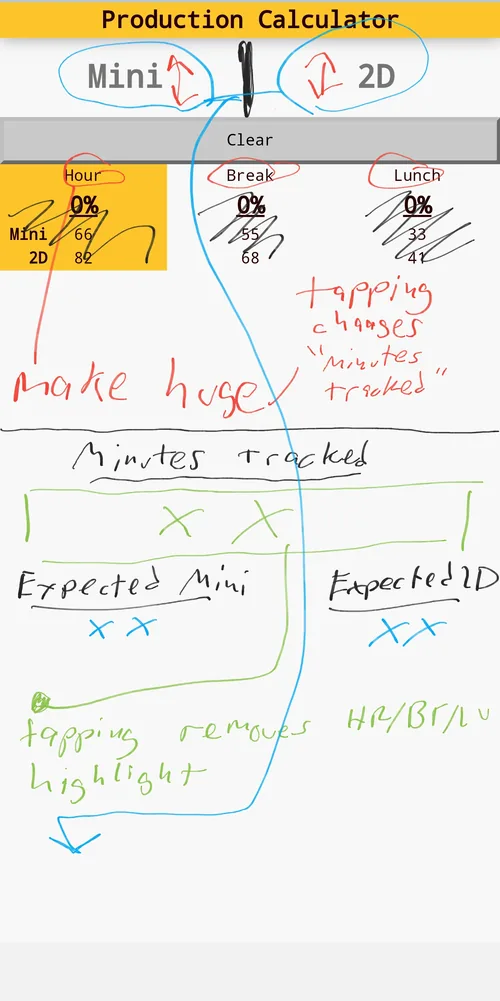
After converting my practically illegible scratches into something real, this was the result:
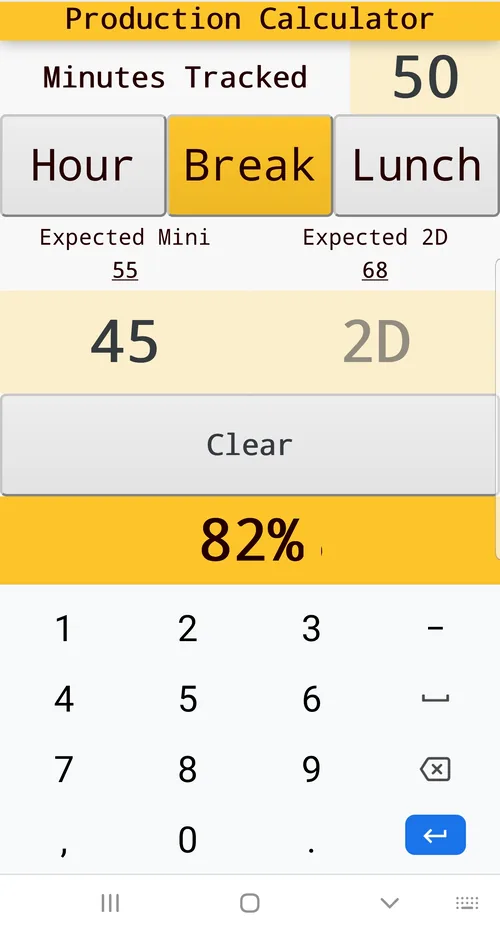
The size of the data entry inputs was increased in order to make them easier to target when rapidly entering data.
The "clear" button size was also increasd, however this button is here only as an alternative way to clear the data. By default, each input field automatically resets when tapped; this helps facilitate rapid data entry.
Conclusion
It's clearly not going to win any design awards, but the app is functional, user-efficient, and gets the job done.
Learning a bit of Elm was definitely worth the effort and it is going to be my go-to language for future web projects.
Happy coding!