Simple Budget Tracker
Jun 3, 2019 - ⧖ 4.0 minI recently decided to get a Bachelor's Degree in Computer Science in order to augment my Associate's Degree in Programming. A B.S. is quite expensive in comparison to an A.S., so keeping better tabs on my budget was in order.
Design
I find it helps to have one ultimate goal for any given project in order to avoid scope creep and stay on track. For this project, the goal was to allow myself to run the application and immediately determine how much I am able to spend on any given purchase.
Thinking on this, I came up with some basic requirements:
- Must show how much I can spend on any given purchase
- Information must be immediately accessible
- Must be mobile friendly
- Must load immediately
I didn't make any mockups for this one, as the requirements dictate that a minimum of information be displayed. The most minimal interface that can be made given these requirements only consists of two pieces of information:
- The type of purchase
- Money available for the type of purchase
Even though I only planned to have two datapoints in the application, I knew I would probably want some more information:
- Purchase history
- Bills
- Whether I was over or under budget
There's not much data to store for this, so database design wasn't needed.
Tech Selection
For application platform, I went with a webapp. Webapps are definitely my preferred deployment method due to speed of development, plus mobile support is included for free. As an added bonus, I used Google Sign-in so I can just login with a single tap.
Since this is a small single-user application, SQLite was the obvious choice to store all my data.
Python was used for the bulk of the project and Rust was used for handling authentication with Google. Rust's enforced error handling would ensure that the authentication server never goes down and I'll always be able to view my budget. Using Python for data entry and rendering would allow me to quickly iterate on new features and I would be able to easily throw together new scripts as needed.
On the web side, I try to avoid web packers as much as possible and just rely on good ol'fashioned scripts and pipes. I chose Jinja2 as the templating engine for the web pages since it's the go-to for Python. Sass and pug were also used as the primary tools for styling and writing the pages.
Implementation
Implementing authentication via Google was straightforward thanks to the excellent documentation available. Once authentication is complete, the server I wrote simply acts as a static file server for the rendered pages.
On the Python side of things, I wrote a library that does some basic CRUD operations for my transactions, then I and glued it all together with scripts. In order to minimize development time, each operation I would want to perform has it's own script (add transaction, new budget for next month, add bills, etc.).
Once coding was finished, the Python portion of the application was nearing the limit of what I would want to write using a dynamically-typed language. Knowing ahead of time this would probably happen, I heavily documented all function argument types and return values as I went along. 20% of the code is comprised of comments for arguments, return types, and class instance variables, which make program modification more manageable.
I ended up only making a single page representing the status of my budget for the current month, as this was the only thing needed.
The entire project gets glued together with just doing the heavy lifting of piping everything where it needs to go.
Result
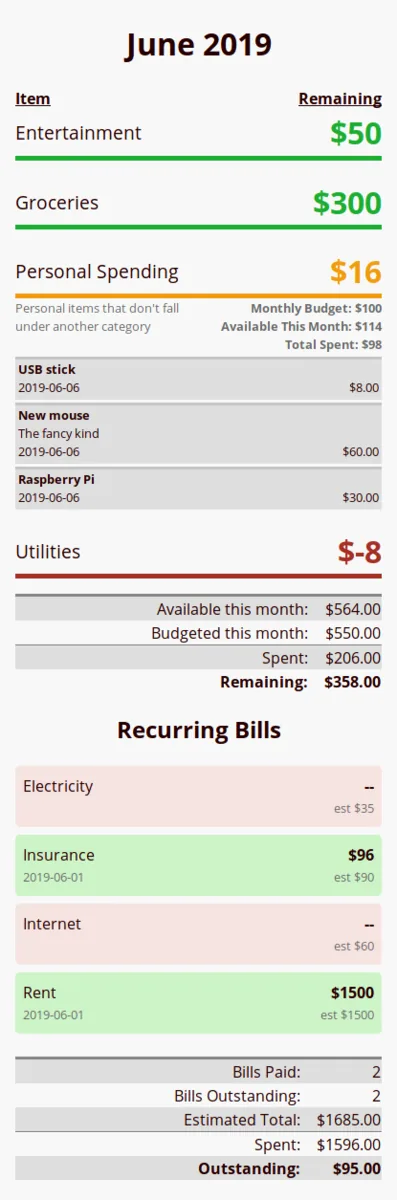
The goal of displaying an expenditure type and budget was complete in about a day. After that I added some extra features:
- Tapping a category brings up transactions
- Colorized budget based on amount remaining
- Optionally "rolling over" budgets into the next month
- This accumulates a budget over time for uncommon expenses like birthday gifts or car repairs
- Custom sorting per item (default is alphabetic)
- Summary of expenditures and remaining budget
- Notes on individual transactions
- Bill listing
- "Expected" & "actual" bill amount
- Colorized bills based on payment status
- Bill summary
Here's a screenshot:
Conclusion
Learning how to use Google Authentication was great and I will probably use identity providers for future projects that require user authentication.
I think Python was a good choice for a project of this scope. However, anything larger would benefit from using Rust or C# for the compile-time type checking.
As with any useful software project, work is never done. Some nice features to add later would be:
- Graphs of expenses over time
- Bill due dates
- Alerts when upcoming bills are due
- Notation when bills are over the estimate by an excessive amount
Happy coding!